CFGROTAT: Configure Installation Angle
Applicable to: UM621 series, UM681A
Read Configuration of Installation Angle
| Syntax | $CFGROTAT |
|---|---|
| Example | $CFGROTAT |
| Description | Read the current installation angle of the positioning module. The receiver outputs the CFGROTAT message after receiving the command. |
| Input/Output | Input |
| No parameter |
Set/Output Configuration of Installation Angle
| Syntax | $CFGROTAT,angleX,angleY,angleZ,mode | |
|---|---|---|
| Example | $CFGROTAT,0,0,0,2 | |
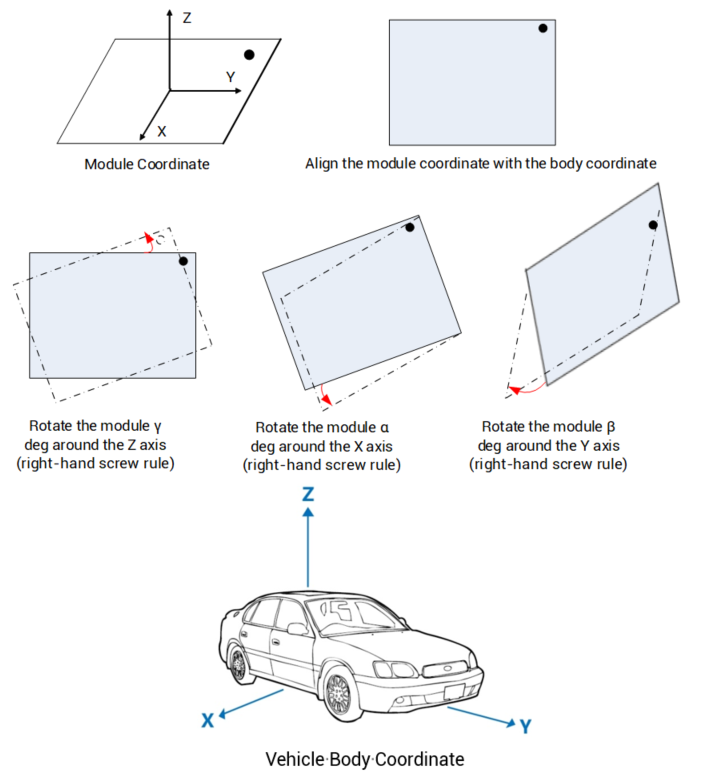
| Description | Set or output the configuration of the module’s installation angle relative to the vehicle body coordinate. |
|
| Input/Output | Input/Output | |
| Parameter Definition | ||
| Parameter | Format | Description |
| angleX | UINT (Optional) | Rotation angle of the module X axis relative to the body coordinate X axis (right-hand screw rule); unit: 1e-2 deg; range: 0 to 36000 |
| angleY | UINT (Optional) | Rotation angle of the module Y axis relative to the body coordinate Y axis (right-hand screw rule); unit: 1e-2 deg; range: 0 to 36000 |
| angleZ | UINT (Optional) | Rotation angle of the module Z axis relative to the body coordinate Z axis (right-hand screw rule); unit: 1e-2 deg; range: 0 to 36000 |
| mode | UINT (Optional) | Configuration mode of installation angle: 0 - General installation mode; the accuracy of input installation angle is rough (within 10 degrees) 2 - Auto installation mode; no need to input the installation angle but need to complete a calibration |